@mebular/dsh-plugin
Mebular 忆云 · 智能体共享记忆与任务协作。通过 DSH 原生插件提供跨设备、跨 Agent 的记忆共享与任务图。插件连接已有的 Mebular App/CLI 运行时;没有时可在面板里按提示安装共享运行时,不会静默启动或下载 Mebular。
安装
dsh plugin --profile web add @mebular/dsh-plugin
沙箱测试结果
| 阶段 | 结果 |
|---|---|
| 1 安装 | ✓ |
| 2 列装 | ✓ |
| 3 挂载 | ✓ |
| 4 启动 | — |
四阶段在隔离沙箱里跑:安装(有网)→ 列装 → 挂载 → 启动(后三步断网)。
README
<div align="center">
<picture>
<source media="(prefers-color-scheme: light)" srcset="https://raw.githubusercontent.com/Windsander/Mebular/HEAD/assets/dsh-plugin-hero-light.svg?v=3">
<img src="https://raw.githubusercontent.com/Windsander/Mebular/HEAD/assets/dsh-plugin-hero-dark.svg?v=3" alt="Mebular — 分布式记忆网络">
</picture>
<details>
<summary>系统主题备用图</summary>
</details>
一份记忆,每个助手,每台设备。
面向 AI 助手的分布式记忆网络。记忆和任务留在你的设备上,设备之间直接同步。
    
不需要托管账号 · 没有中心协调者
App 与 DSH Plugin 是同一套本机 runtime 的两个入口。插件默认 attach,
不会静默启动或下载;没有 runtime 时先询问。
</div>
<div align="center">
静止时的星图:设备与共同订阅关系。 · 悬停时:任务域航道与实时 fleet 流量。蓝线与金线表示本机 ↔ 各设备的任务域双向可达关系,不是设备之间的互连。
</div>
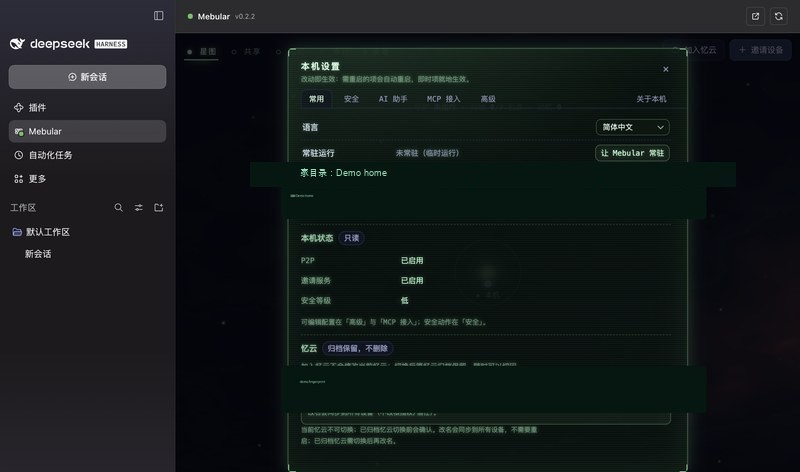
完整 DSH 面板 · 入口与星图 · 折叠侧栏 · Console 全宽 · 共享记忆视图 · 设置与常驻配置
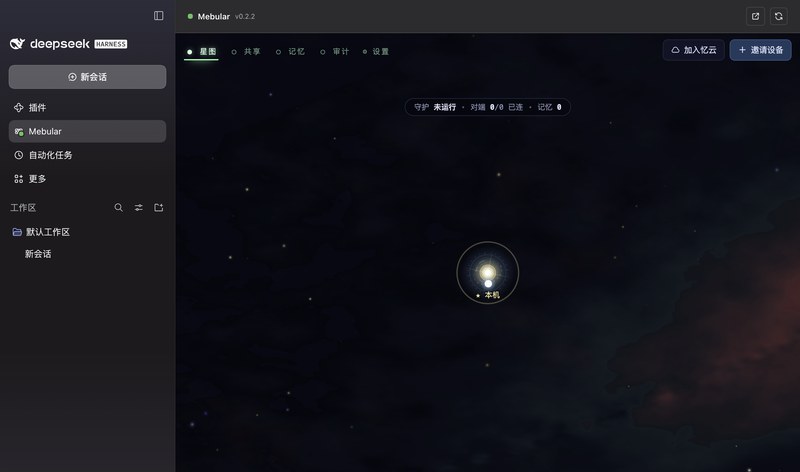 · 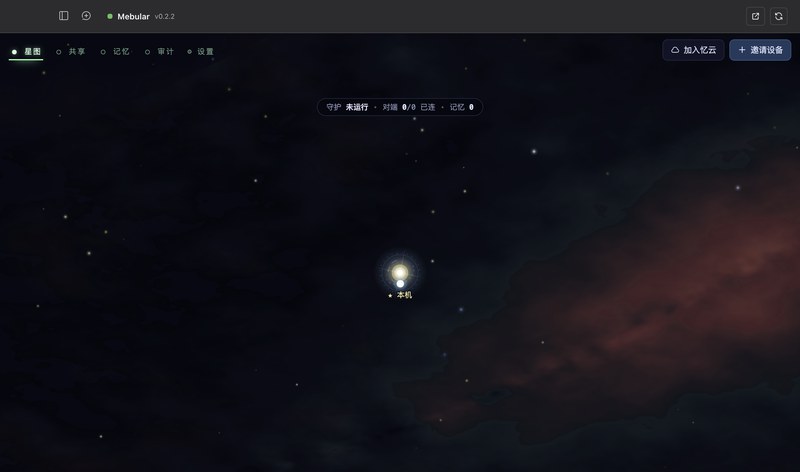 · 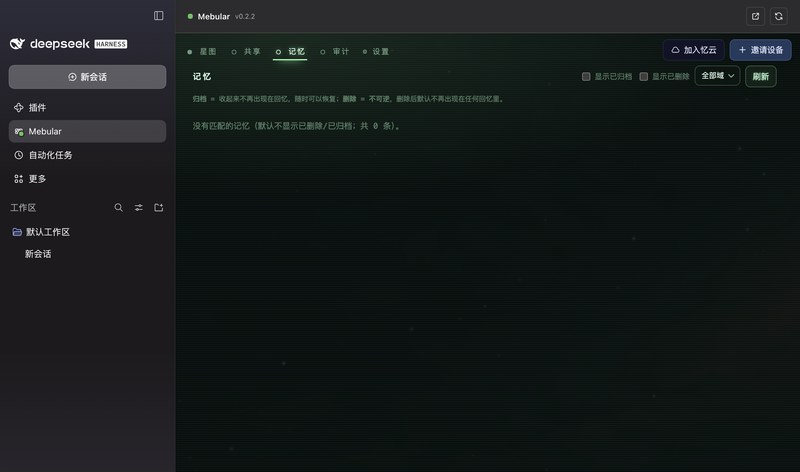 · 
运行方式
<div align="center">
<picture>
<source media="(prefers-color-scheme: light)" srcset="https://raw.githubusercontent.com/Windsander/Mebular/HEAD/assets/one-graph-cn-light.svg?v=3">
<img src="https://raw.githubusercontent.com/Windsander/Mebular/HEAD/assets/one-graph-cn.svg?v=3" alt="为什么是 Mebular:一张共享的图,不是孤岛;本地优先、点对点、可审计、MCP">
</picture>
<picture>
<source media="(prefers-color-scheme: light)" srcset="https://raw.githubusercontent.com/Windsander/Mebular/HEAD/assets/memory-runtime-cn-light.svg?v=3">
<img src="https://raw.githubusercontent.com/Windsander/Mebular/HEAD/assets/memory-runtime-cn.svg?v=3" alt="记忆运行时:轻量 MCP 与沉浸式两种接入,共用同一张图。">
</picture>
<details>
<summary>系统主题备用图</summary>
</details>
0.3 在 MCP 之上增加可选运行时。默认关闭;本地 Qwen 可选。
</div>
DSH 接入
<div align="center">
<picture>
<source media="(prefers-color-scheme: light)" srcset="https://raw.githubusercontent.com/Windsander/Mebular/HEAD/assets/dsh-memory-mesh-cn-light.svg?v=3">
<img src="https://raw.githubusercontent.com/Windsander/Mebular/HEAD/assets/dsh-memory-mesh-cn-dark.svg?v=3" alt="一张记忆图:两台机器,每台一个 Mebular 节点;机器 A 连接 DSH、Hermes、Codex,机器 B 连接 Pi、OpenCode、Cursor;两个节点直接同步同一张图。">
</picture>
<picture>
<source media="(prefers-color-scheme: light)" srcset="https://raw.githubusercontent.com/Windsander/Mebular/HEAD/assets/dsh-capabilities-cn-light.svg?v=3">
<img src="https://raw.githubusercontent.com/Windsander/Mebular/HEAD/assets/dsh-capabilities-cn-dark.svg?v=3" alt="DSH 里得到什么:侧边栏共享 Console、官方 MCP 工具、状态点、attach / managed / auto 生命周期与按需安装更新;panel: false 只保留 MCP。">
</picture>
<details>
<summary>系统主题备用图</summary>
</details>
</div>
使用说明
<div align="center">
<picture>
<source media="(prefers-color-
…(truncated)
以上内容来自 npm 上的 README,我们只做格式化,不改内容。
版本
npm 上共发布:11,最后更新 2026-11-06